Aspire gives you a free zero-based budget in Google Sheets, with the structure to stay current and the flexibility to recover when life gets messy.
See the complete free Google Sheets budget template →
Get the free template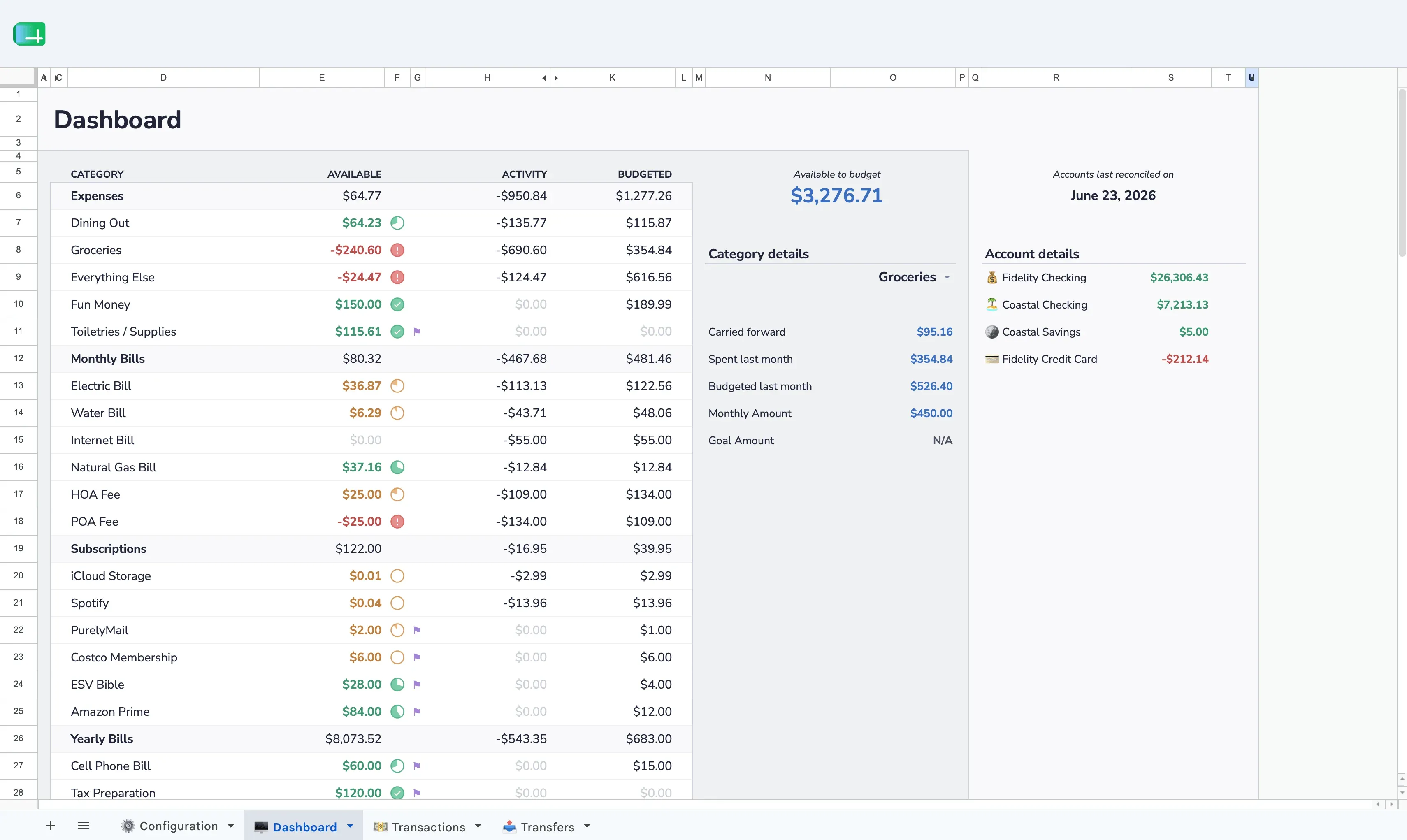
Assign every available dollar to a category before you spend. When your Available to Budget reaches zero, every dollar has a job.
Open one dashboard tab and see what's safe to spend, what's already spoken for, and whether the month is drifting off plan.
Built-in reports that update automatically as you log transactions. No manual chart-building required.
Share the spreadsheet with a partner, spouse, or family member using Google Sheets' built-in sharing. Both people can view and edit simultaneously — no extra accounts, no extra cost.
Your Aspire budget lives in Google Drive. Aspire never asks for your bank credentials or maintains a persistent connection to your accounts.
Customize categories and groups, then build custom views on separate tabs. Aspire gives you structure with room to extend it safely.
Choose your budget currency, use your browser’s familiar number conventions in the sidebar, and control spreadsheet currency and date formats with two sample cells.
Switching from YNAB? Export your Register CSV and bring your transaction history into Aspire — no Turbo subscription required.
$5/month. Cancel any time. The core budget works without it.
Import common bank CSV exports with flexible column mapping that remembers your format. No Plaid connection and no bank credentials required.
How it works →Infers Payees and Categories from your reviewed transaction history, then marks each changed cell by confidence. No AI or external services.
How it works →Fund all your budget categories in one click. Quick Budget calculates what each category needs based on your targets and goals, then writes the transfers for you.
How it works →See where every category is headed before the month ends. Budget Forecast projects your spending and warns you about categories on pace to overspend.
How it works →Automatically detects subscriptions and recurring bills from your transaction history. Find forgotten charges, spot price increases, and see your total recurring spend at a glance.
How it works →Divide a single purchase across multiple budget categories. One receipt, multiple categories — each reflects what you actually spent without manual row editing.
How it works →Check category balances, review recent activity, and add transactions from a phone-friendly app connected to the Aspire spreadsheet you explicitly link.
Explore Aspire Mobile →Copy the spreadsheet to your Drive. Add your accounts and categories. Assign your income. Done.
Copy the free templateNo Aspire account. No credit card. The core stays free.
 Aspire Budgeting