 Aspire Budgeting
Best Google Sheets Budget Templates & Tools (2026)
Compare Google Sheets budget templates and tools from Google, Aspire, Tiller, and DIY options by cost, automation, budgeting method, and maintenance.
By Matt Alcorn · Updated August 30, 2026
Jump to a section
- Quick comparison
- How we evaluated the options
- 1. Google’s budget templates — best for a simple starting point
- 2. Aspire Budgeting — best for a free-core zero-based system
- 3. Tiller — best for automatic financial feeds
- 4. A DIY Google Sheet — best for builders
- Which option should you choose?
- Frequently asked questions
- Related reading
The best Google Sheets budget option depends on whether you want a simple starting template, a complete budgeting method, automatic bank feeds, or a system you build yourself. Those are different jobs, so there is no honest winner for everyone.
Short answer: Use Google’s template gallery for a lightweight starting point. Choose Aspire for a maintained, free-core zero-based budget. Choose Tiller when automatic financial feeds are worth a subscription. Build your own spreadsheet when customization matters more than setup time.
Copy Aspire’s free Google Sheets template →Quick comparison
| Option | Cost | Transaction workflow | Budgeting approach | Best for |
|---|---|---|---|---|
| Google budget templates | Free | Manual | Basic planning and tracking | Starting with a simple Google-created sheet |
| Aspire Budgeting | Free core; optional Turbo | Manual or CSV import | Envelope-style zero-based budgeting | A ready-to-use budgeting system without automatic bank feeds |
| Tiller | $99/year after a 30-day trial | Connected financial feeds | Custom category budgets in its Foundation Template | Spreadsheet users who prioritize automated data |
| DIY Google Sheet | Free | Whatever you build | Fully custom | Spreadsheet builders willing to maintain formulas and workflows |
How we evaluated the options
We compared cost, transaction workflow, budgeting method, reporting, data location, setup, and ongoing maintenance. Product details and prices were rechecked on August 31, 2026, using provider documentation.
Editorial disclosure: Aspire Budgeting publishes this comparison and is one of the products included. We therefore describe where Google, Tiller, or a DIY sheet is the better fit instead of treating Aspire as the default answer.
1. Google’s budget templates — best for a simple starting point
Google provides budget templates through the Google Sheets Template Gallery. Google explains that selecting a template opens a new copy, so you can edit it in your own Drive without starting from a blank spreadsheet.
Strengths:
- Free and already available inside Google Sheets
- Familiar spreadsheet interface
- Easy to copy, customize, and share
- Enough structure for basic income-and-expense planning
Tradeoffs: A Google-created template is a starting workbook, not a maintained budgeting service. If you need envelope balances, category transfers, multi-month reports, or a specialized import workflow, you will need to add and maintain those pieces yourself.
Choose it when: You want a lightweight monthly plan and do not yet know whether you need a more structured budgeting method.
Open Google’s official template instructions →
2. Aspire Budgeting — best for a free-core zero-based system
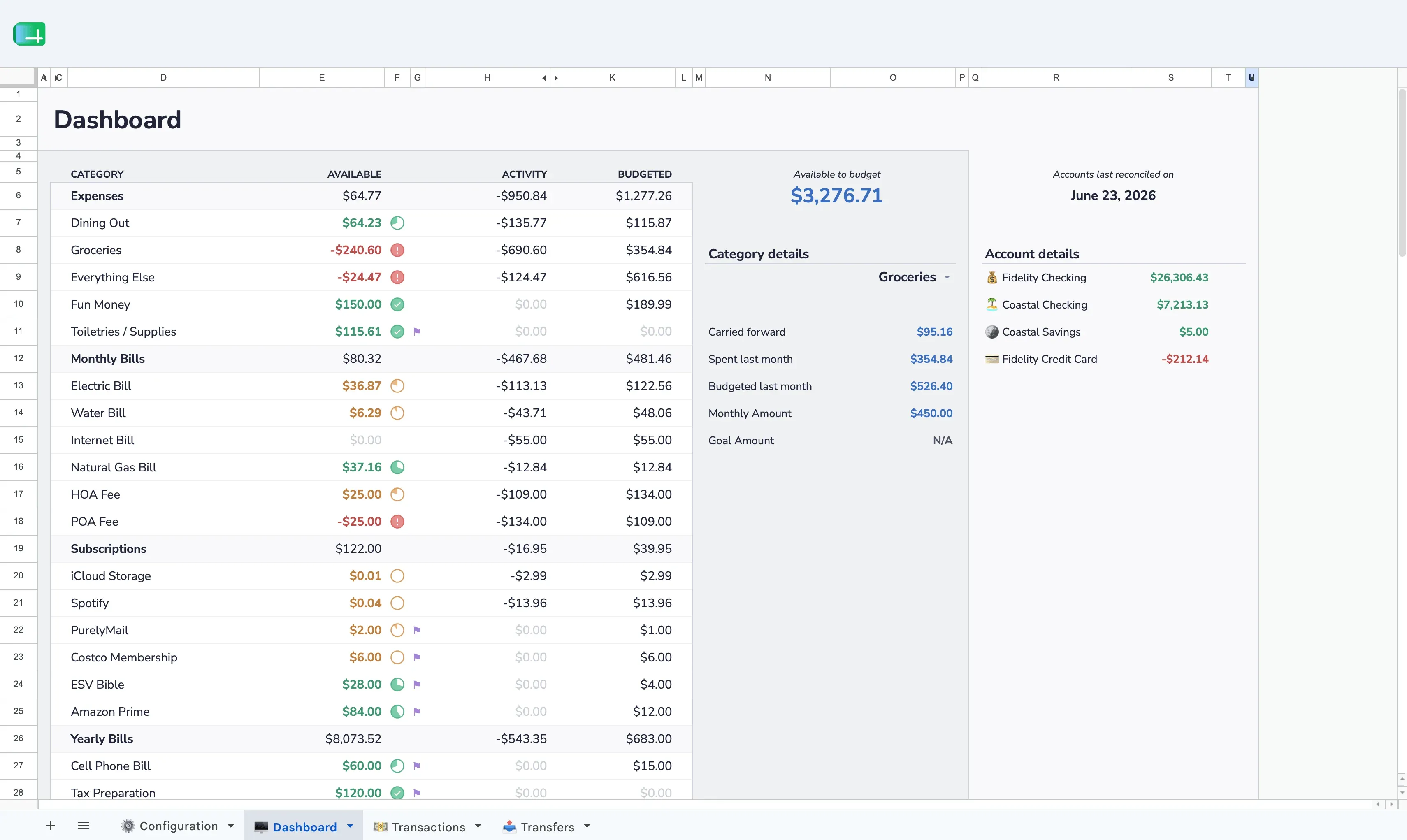
Aspire is a maintained Google Sheets workbook built around envelope-style zero-based budgeting. You assign the money you have to categories, record transactions, and move money between categories when plans change.
The free core includes:
- A dashboard with category and account balances
- Transaction entry and category assignment
- Category transfers and monthly rollovers
- Spending, trend, income-versus-expense, budget-versus-actual, and money-flow reports
- Multiple-account support
- A workbook that lives in your Google Drive
Transaction workflow: Enter transactions manually in the free spreadsheet. The optional Aspire Turbo upgrade costs $5/month after a 30-day trial and adds bank-CSV import, Auto-Categorize, and Aspire Mobile. It does not connect directly to bank accounts.
Tradeoffs: Aspire does not provide automatic bank feeds. The free mobile experience uses the Google Sheets app; Aspire Mobile is a focused PWA included with Turbo rather than a native App Store or Play Store application.
Choose it when: You want a complete budgeting method and reports in Google Sheets, but manual entry or periodic CSV import is acceptable.
See everything included in Aspire’s free template →3. Tiller — best for automatic financial feeds
Tiller connects financial accounts and brings transactions and balances into Google Sheets or Microsoft Excel. Its supported Foundation Template includes transactions, categories, monthly budgets, spending trends, cash flow, and net-worth tracking. That makes Tiller a real budgeting product as well as a financial-data service.
Tiller currently costs $99/year after a 30-day trial. Its documentation says it uses Yodlee and Plaid, supports more than 10,000 U.S. financial institutions between them, and is currently limited to U.S. customers. Some institutions or spreadsheets can still require a manual refresh or fill action.
Strengths:
- Connected transaction and balance feeds
- Supported Foundation Template for Sheets and Excel
- AutoCat categorization rules
- Flexible official and community templates
- Up to five linked spreadsheets under one subscription
Tradeoffs: The annual subscription and linked-account setup are meaningful differences from a manual spreadsheet. Its Foundation Template supports monthly category budgets, but it is not designed around Aspire’s envelope-style category balances and transfers. Connection availability and refresh behavior depend on the institution.
Choose it when: Avoiding manual transaction entry is more important than using a free or specifically envelope-style system.
See Tiller’s Foundation Template or check current Tiller pricing.
4. A DIY Google Sheet — best for builders
A blank Google Sheet gives you full control over categories, formulas, dashboards, scripts, and imports. It is the most flexible option and the easiest one to tailor to an unusual household or reporting need.
Strengths:
- No product subscription
- Complete control over formulas and layout
- No dependency on a third-party budgeting product
- A good fit for people who enjoy spreadsheet engineering
Tradeoffs: You own the testing and maintenance. Category rollovers, account reconciliation, transfers, import deduplication, and historical reporting take substantially more work than a one-month planned-versus-actual table.
Choose it when: Building and maintaining the system is part of the appeal, not an obstacle between you and budgeting.
Follow the step-by-step Google Sheets budget guide →
Which option should you choose?
- Choose Google’s template for the smallest possible starting point.
- Choose Aspire for envelope-style zero-based budgeting with a free core and optional CSV tools.
- Choose Tiller for automatic financial feeds and a broader spreadsheet-template ecosystem.
- Build your own when custom formulas and workflows matter more than setup time.
The most important distinction is not “template versus app.” It is how transactions enter the spreadsheet and whether the workbook already implements the budgeting method you want. Pick the workflow you can keep current after the first month.
Frequently asked questions
What is the best free budget template for Google Sheets?
Google’s own templates are a good free starting point for basic planning. Aspire is a stronger free-core option when you specifically want envelope-style zero-based budgeting, category balances, transfers, and multi-month reports.
Can Google Sheets import bank transactions automatically?
Not through a basic budget template alone. Tiller provides connected financial feeds for a yearly subscription. Aspire’s optional Turbo tools import bank-downloaded CSV files without maintaining a direct bank connection.
Is Tiller only a transaction-import service?
No. Tiller’s supported Foundation Template includes category budgets, transactions, spending trends, cash flow, and net-worth tracking in addition to its financial feeds.
What is the difference between a budget template and a budgeting tool?
A template gives you a workbook structure to use and customize. A budgeting tool may also maintain formulas, provide an add-on or interface, import data, supply ongoing updates, or implement a specific budgeting method. Aspire and Tiller both extend beyond a one-time template, but they emphasize different workflows.
Related reading
- Free Google Sheets Budget Template — Review Aspire’s free-core workbook and copy it to your Drive.
- Compare the Best Free Budget Templates — A free-only comparison across Google Sheets, Excel, and printable options.
- Aspire vs Tiller — A detailed comparison of two spreadsheet-native approaches.
- How to Make a Budget in Google Sheets — Build a simple working spreadsheet yourself.
- Aspire Turbo — Import CSV transactions and use Auto-Categorize without a direct bank connection.
- Learn to Budget with Google Sheets — Browse all guides, methods, and comparisons.