 Aspire Budgeting
Budget vs Actual report
Learn how to compare current monthly category targets with actual spending and review over-target months by group or category.
Updated August 10, 2026
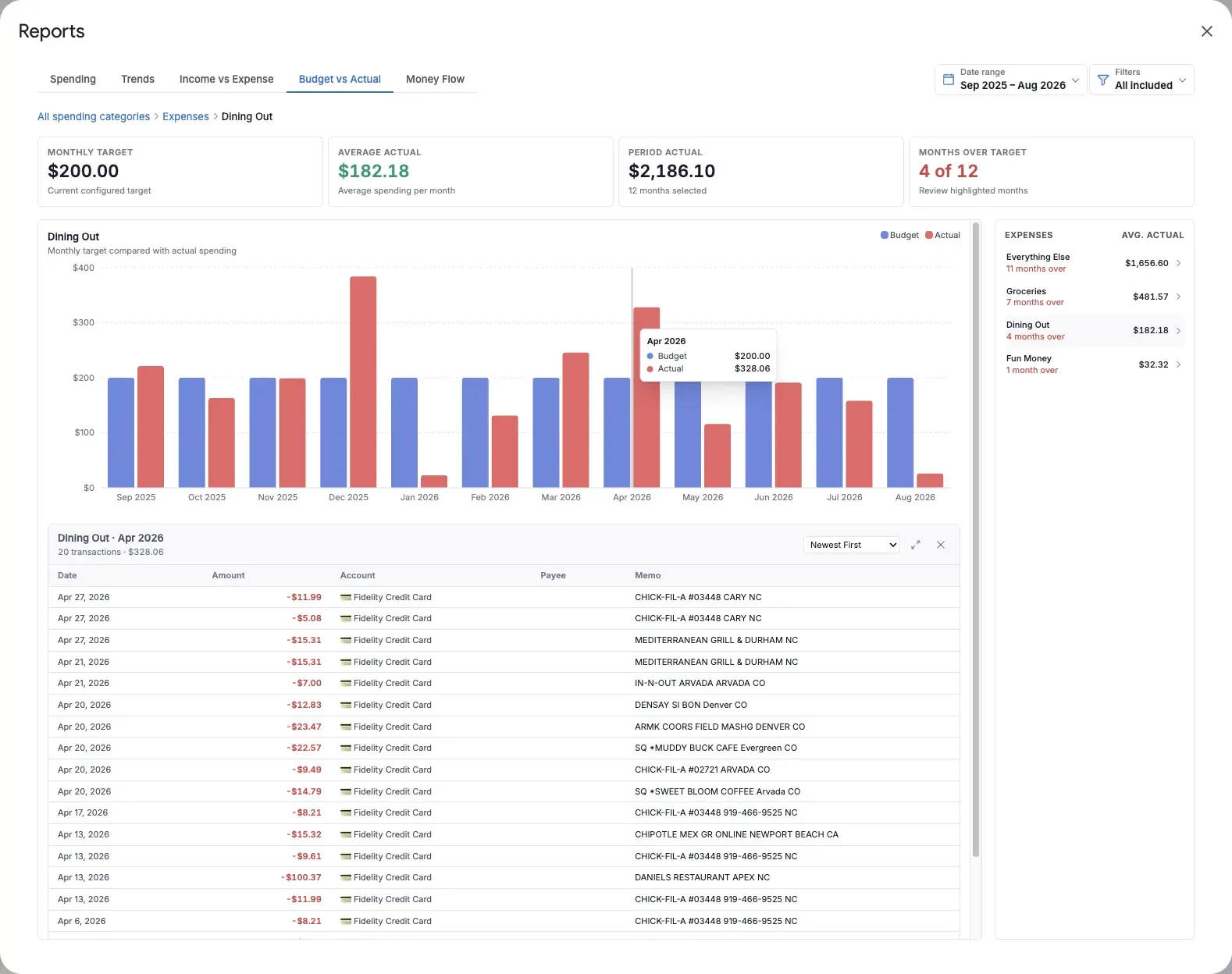
Budget vs Actual answers: How did my spending compare with the monthly targets I have set? It places a target bar beside actual outflows for each month in the selected range.
Use it to find categories that regularly need attention and to decide whether your spending should change or your target is no longer realistic.
What the report shows
For the current scope, the summary includes:
- Monthly target: The configured monthly target
- Average actual: Average monthly spending during the selected period
- Period actual: Total spending during the selected period
- Months over target: How many selected months exceeded the target
The bar chart compares target and actual for each month. Months whose actual spending exceeds the target are visually highlighted.
Review a group or category
The report begins with all spending categories combined.
- Select a category group from the list beside the chart.
- Select a category inside that group for a more focused comparison.
- Use the breadcrumb to return to the group or complete budget view.
The list shows each item’s average actual and how many months were over target, helping you decide where to investigate first.
Open monthly transactions
Select an Actual bar to open the outflow transactions for that month and the active group or category. The target bar is a reference value and does not open transactions.
How targets work across a date range
The Aspire workbook stores each category’s current monthly target, not a history of previous targets. The report therefore uses the current target as the reference for every month in the selected range.
If you changed a category target recently, earlier months are still compared with the new target. Treat the report as a consistent comparison against today’s plan, not a reconstruction of what the plan was at that time.
Savings goals are excluded because a goal describes funding progress rather than a monthly spending limit. Hidden categories are also excluded.
How filters affect the comparison
- Category filters affect both targets and actual spending.
- Account and Payee filters affect actual spending only because category targets are not tied to an account or merchant.
This means a filtered Actual bar can be compared with the complete target for the included category scope. Keep that distinction in mind when filtering to one account or payee.
Useful ways to use Budget vs Actual
- Review categories that exceeded target in several months, not just once.
- Compare Average actual with Monthly target before changing next month’s plan.
- Drill into an over-target month to separate a one-time expense from a recurring pattern.
- Use a Category filter to compare only flexible spending or only essential bills.