 Aspire Budgeting
Money Flow report
Learn how to follow external income through your accounts into spending groups and understand Balance used and Net retained.
Updated August 10, 2026
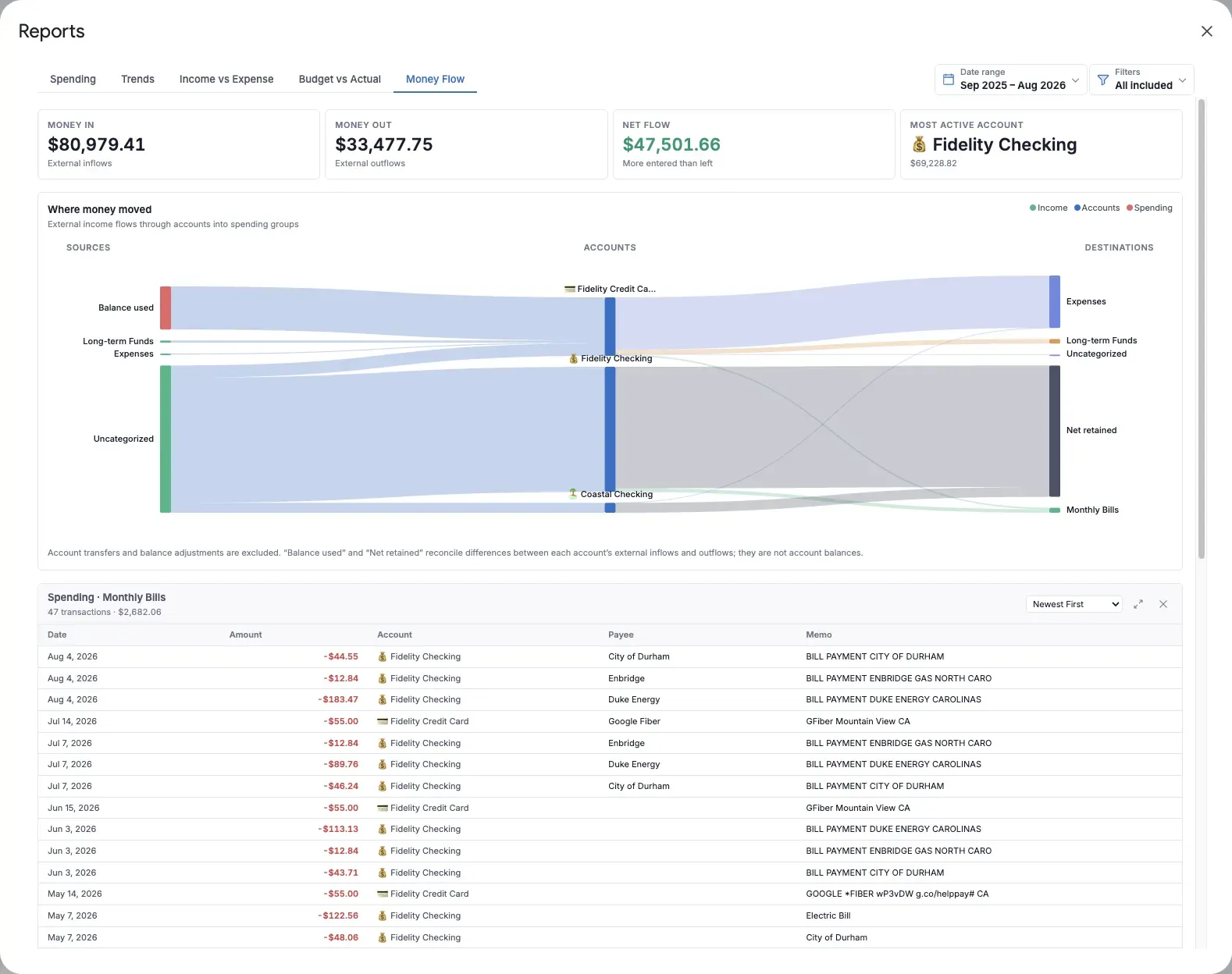
Money Flow answers: How did money move into, through, and out of my accounts? It uses a flow diagram to connect external income sources to accounts and accounts to spending groups.
The width of each stream represents its amount. Wider streams carried more money during the selected period.
What the report shows
The summary metrics include:
- Money in: External inflows
- Money out: External outflows
- Net flow: Money in minus money out
- Most active account: The account with the greatest combined external inflow and outflow
The diagram is organized into three columns:
- Sources: Income category groups and, when needed, Balance used
- Accounts: The accounts that received or spent the money
- Destinations: Spending category groups and, when needed, Net retained
Inspect a flow
Hover over a node or stream for its exact amount. Select an income source, account, spending destination, or stream to open the transactions represented by it.
The Account activity table below the diagram provides exact Money in, Money out, and Net flow totals for each account. Select an account or amount to open the matching transaction details.
While transaction details are open, Account activity is hidden so the selected flow remains the focus. Close the details to return to the table.
Understand Balance used
An account may have more external outflow than external inflow during the selected period. Money Flow adds Balance used as a source to reconcile that difference.
This often means the account spent money that was already present before the selected date range. Balance used is not an account balance and does not represent a separate transaction.
Understand Net retained
An account may receive more external inflow than it sends to spending groups. Money Flow adds Net retained as a destination for the difference.
This means more money entered the account than left it during the period. Net retained is not necessarily savings and is not a separate transaction.
What is excluded
Account transfers and balance adjustments are excluded. Transfers move money between your own accounts, so including them would make the diagram appear to have more income and spending than actually occurred.
Useful ways to use Money Flow
- See which accounts handle most household activity.
- Trace a particular income source through the accounts that received it.
- Compare the spending groups drawing from each account.
- Explain why Money in and Money out differ during a short date range.
For a simpler month-by-month comparison of total income and expenses, use Income vs Expense.