 Aspire Budgeting
Introducing the Aspire Budgeting Add-on for Google Sheets
The new Aspire Budgeting add-on brings a sidebar, visual reports, diagnostics, YNAB import, and optional Turbo tools like CSV Import, Auto-Categorization, Quick Budget, Budget Forecast, Recurring Expense Tracker, and Split Transaction to your Aspire spreadsheet.
By Matt Alcorn · Updated August 13, 2026
Jump to a section
Aspire Budgeting has always been a spreadsheet first.
That is still true. The core Aspire template is free, it lives in your Google Drive, and you can keep using it without paying for anything. But there are some things a spreadsheet can only do so comfortably on its own. Visual reports, guided imports, diagnostics, split transactions, recurring expense detection, and one-click budgeting all work better when they have a little interface around them.
That is why I am excited to introduce the new Aspire Budgeting add-on for Google Sheets.
It gives Aspire a sidebar inside your spreadsheet: a place for tools, reports, support, and the new optional Aspire Turbo features that make staying current with your budget much faster.
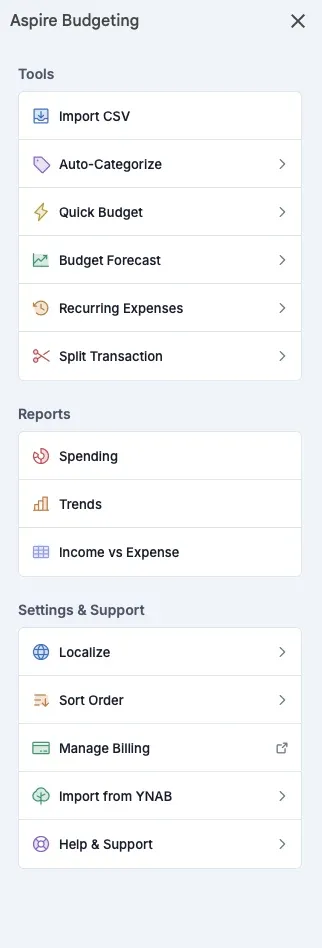
What the Add-on Adds to Aspire
The add-on is meant to make Aspire easier to use without changing the spirit of the system. Your budget still belongs to you. Your data still lives in your spreadsheet. The add-on simply gives you better ways to work with it.
The free add-on includes:
- Budget Snapshot for a quick sidebar view of category groups and account balances
- Spending Report for seeing where your money went by date range, category, or account
- Trend Report for looking at category patterns over time
- Income vs Expense for comparing money coming in with money going out
- Diagnostics for catching common spreadsheet issues like missing starting balances, orphaned categories, and account mismatches
- Import from YNAB for bringing your YNAB Register CSV into Aspire without a Turbo subscription
Those features are free because they support the basic job of keeping a budget understandable. If you want Aspire to remain a spreadsheet-only system, you can still do that. If you want a little more help staying on top of the numbers, the add-on is there.
Aspire Turbo: Optional Tools for the Repetitive Work
The biggest new addition is Aspire Turbo, a set of premium tools built into the add-on. Turbo is for the work that tends to make people fall behind: importing transactions, cleaning up categories, funding the month, checking whether spending is on track, and dealing with mixed-category purchases.
Turbo is optional. It costs $5/month, includes a 30-day free trial, and can be canceled any time. The free spreadsheet remains free either way.
Here is what Turbo includes.
CSV Import
CSV Import lets you download transactions from your bank or credit card as a CSV file and import them into Aspire in bulk.
Instead of typing every transaction by hand, you upload the file, map the date, amount, and description columns, preview the results, choose the account, and import. The add-on can remember saved mappings for future imports, so once your bank’s format is set up, the next import is much faster.
It also includes duplicate detection for transactions imported through CSV, which helps prevent overlapping downloads from cluttering your Transactions sheet.
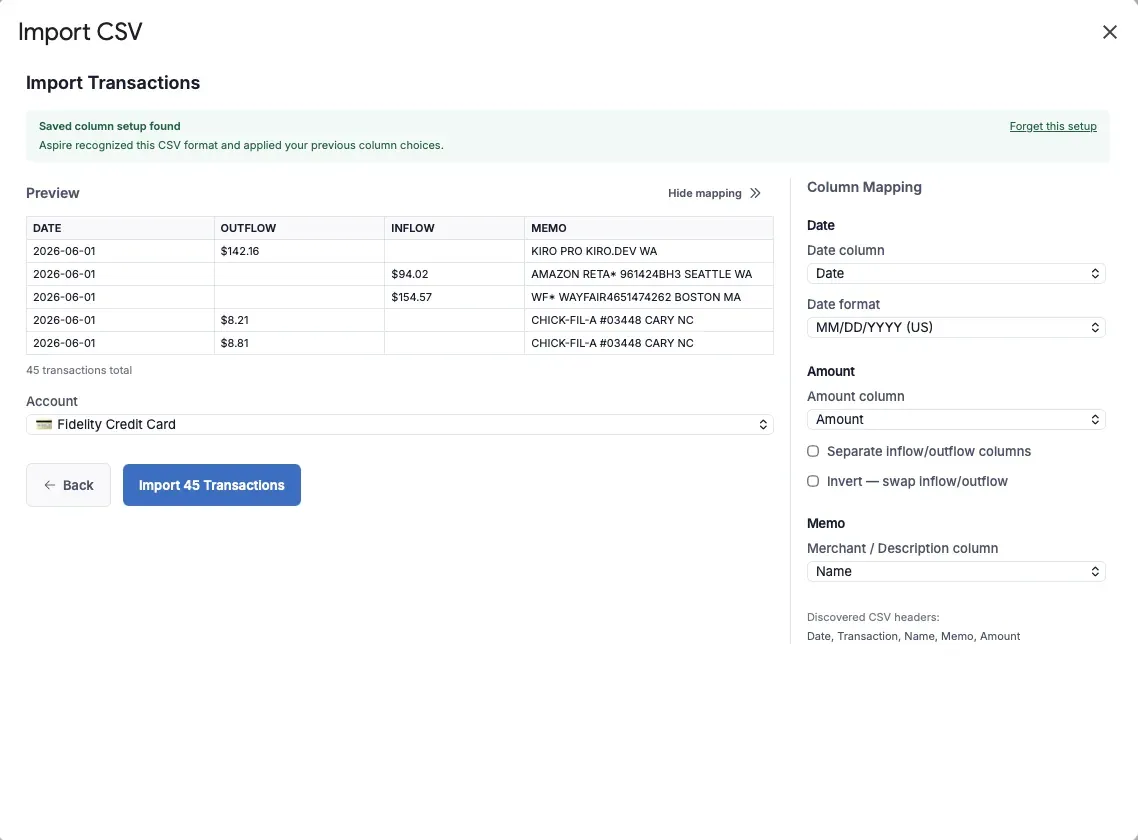
The important part: CSV Import does not ask for your bank login. You download the file yourself and choose what to import. No Plaid connection, no banking credentials handed to a third party, and no automatic access to your accounts.
Auto-Categorization
Once transactions are imported, the next chore is usually categorizing them. Auto-Categorization helps with that by looking at your own history.
Turbo first uses the bank description to infer a blank Payee. It then combines Payee and description history to fill a blank Category. It normalizes messy bank descriptions too, so variations like store numbers, city names, and card prefixes do not get in the way as much.
There is no AI service involved and no external categorization engine. It is simply your own transaction history working for you inside your spreadsheet. The more consistent you are, the more useful it becomes.
Only changed Payee and Category cells are marked. Blue means repeated exact history; orange means the suggestion used limited or approximate history and deserves closer review. Correct anything that needs changing, then accept the review marks in the sidebar.
Quick Budget
Quick Budget is built for the moment when income arrives and you need to give those dollars jobs.
It reads your category targets and goals, calculates how much each category needs, shows you a preview, and lets you fund selected categories in one action. You can adjust amounts, skip categories, and review the total before anything is written to your spreadsheet.
For regular categories, it tops them up toward the monthly amount. For goal categories, it uses your monthly contribution amount unless the goal is already funded. When you approve the preview, Turbo writes the transfers to your Category Transfers sheet for you.
That turns what used to be a long series of small manual transfers into one focused budgeting pass.
Budget Forecast
Budget Forecast gives you a read-only view of where the month appears to be headed.
It looks at current-month spending by category, compares your pace to the day of the month, and projects where each category may land by month-end. If a category is on pace to overspend, the forecast surfaces it early so you still have time to adjust.
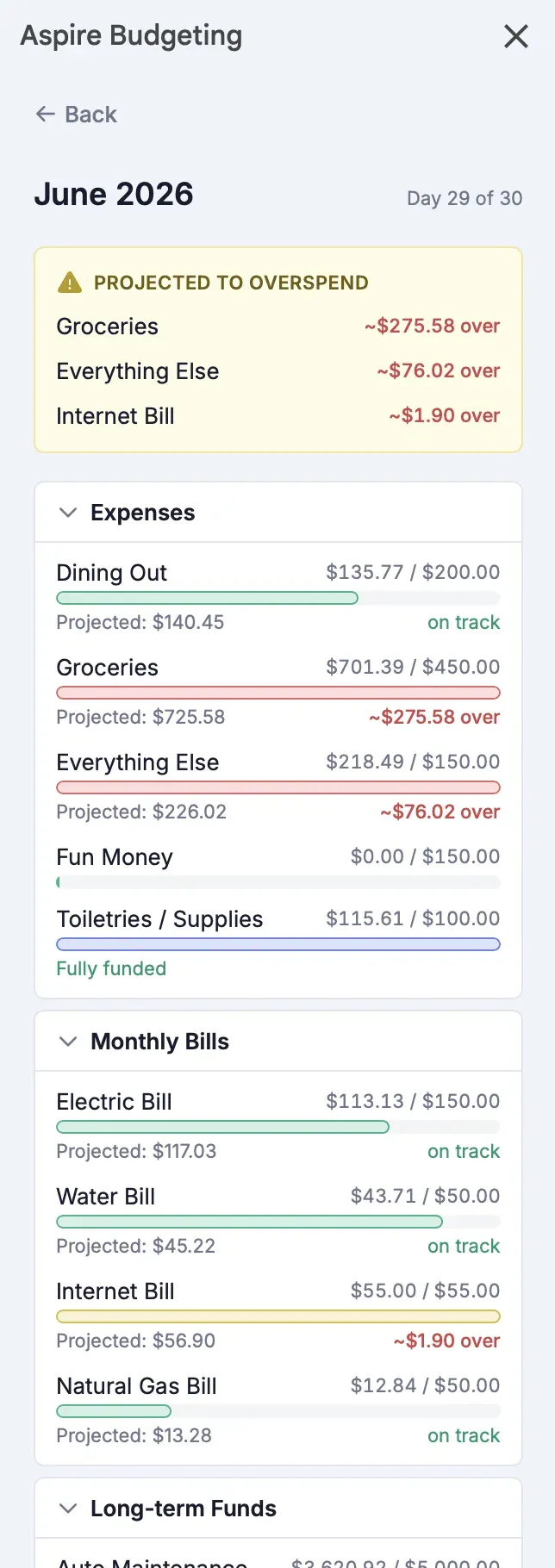
For savings goals, Budget Forecast shows progress toward the goal and estimates how long it may take to fully fund it based on your monthly contribution. It does not modify your spreadsheet; it only reads the data already there and turns it into a clearer picture.
Recurring Expense Tracker
Subscriptions and recurring bills are easy to forget because they are designed to disappear into the background. The Recurring Expense Tracker brings them back into view.
Turbo scans your transaction history for charges that repeat on monthly, quarterly, or yearly patterns. It groups potential recurring expenses by confidence level, shows the estimated monthly and annual cost, and can flag price increases when the most recent charge is higher than the first one detected.
No manual tagging is required. The tracker works from the history you have already entered or imported, which means it gets more useful as your budget history grows.
Split Transaction
Some purchases do not fit neatly into one category. A Target trip might include groceries, household supplies, and clothing. A single online order might include a gift and a personal expense.
Split Transaction lets you divide one purchase across multiple categories from the add-on sidebar. You choose a recent transaction, add the split amounts and categories, and apply the split once the parts match the original total exactly.
Aspire keeps the account-level total accurate while assigning the category-level pieces where they belong. That means your account balance and category budgets can both stay correct without a bunch of manual row editing.
A Better Way to Keep the Spreadsheet You Already Like
The goal of the add-on is not to turn Aspire into a closed budgeting app. The goal is to keep the parts people love about Aspire — ownership, flexibility, zero-based budgeting, and Google Sheets — while making the repetitive parts easier to manage.
Use the free add-on for reports, diagnostics, budget snapshots, and YNAB import. Try Turbo if you want faster CSV imports, smarter category cleanup, one-click funding, forecasting, recurring expense detection, and transaction splitting.
Either way, your spreadsheet remains the center of the system.